
Pre-requisites: What you need before you start
1. Stata installed on your computer
2. The World Bank Open Data indicator code (sometimes called the “series code” or “ID”) for the variable you want to download. If you don’t have this, don’t worry! We’ll show you exactly how to get it.
Step 1: Installing the World Bank Open Data module in Stata
Open Stata and run:
ssc install wbopendata
Give Stata some time to finish the install. Onc
e complete, you can verify that the command is available by listing installed ado-files:
ado dir
You should see wbopendata in the results if it installed correctly. Kinda like this:

Step 2. Finding the World Bank Indicator Code (ID)
Next, go to the World Bank Open Data site and search for the dataset or indicator you need. For example, suppose we want a dataset on the proportion of individuals in the world using the internet. We can type this in at the search bar and select “Individuals using the internet (% of population)”. Click on “Details” as shown below and locate the indicator code (ID).
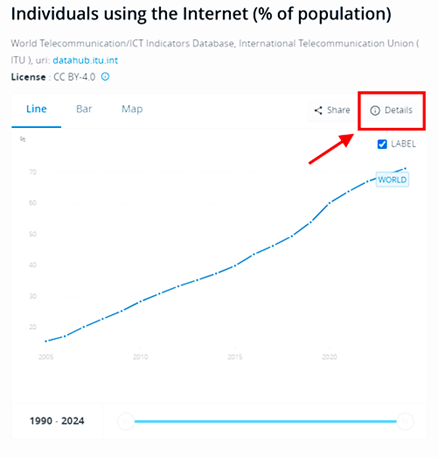
In our example, the indicator code is: IT.NET.USER.ZS This is the code we will paste into Stata.
Step 3. Open the World Bank import window in Stata
In Stata, run:
db wbopendata
This will open a dialog window that lets you pull World Bank indicators without memorising command syntax. In the dialog, paste your indicator code into the “Indicator – All series” field.
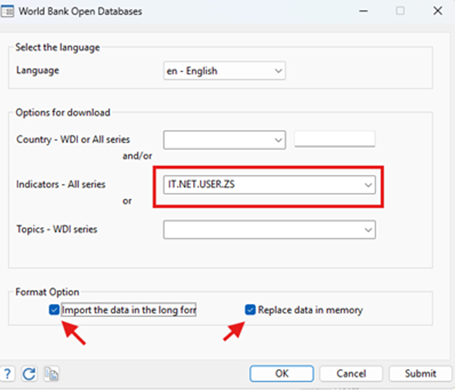
It is crucial that you also check the following settings:
1. Select “import the data in the long format” (this is critical).
2. Select “Replace data in memory” if you want Stata to overwrite whatever dataset is currently open.
Click OK. If the import worked, you will see the new variables in your Variables window.
Step 4. Sanity-check what downloaded
It is best-practice to confirm what Stata imported:
describe
This helps you verify the key fields you will later use for merges (usually country identifiers and year) and confirm that the indicator values are present and stored as numeric.
Step 5. Save the dataset locally as a Stata file
Assuming that your data is satisfactory, save it locally.
save internetusepercentage
We used “internetusepercentage” here but the filename is up to you. Stata will save it as a .dta file in your current working directory (your default user folder, unless you changed it)
That’s it! You can bring in other indicators and even merge and append your data with other quality datasets (survey data, WDI-based country covariates, IMF, OECD, etc.) to address your research question(s).